
Large images with real detail
The model is trained for 8 MP output, and that is where skin texture, stray hairs and small jewelry come through. Here you can pick 1K up to 4K, which is about 16.8 MP.
Pruna AI’s open image model · up to 16 MP
P-H3-Image is an open-weight model from Pruna AI, built on MiniMax H3, that makes images from text and edits photos using up to 8 input images. Here you can run it in your browser without a GPU, and read our ComfyUI and prompt guides.
Write a prompt for a new image, or upload up to 8 images and describe the change. The credit cost appears under the Generate button before every run.
Say what the image is in the first sentence, put any text in quotes, and leave out words like “stunning” or “8k”.
Resolution
The model works best at high resolution. 3K (about 9.4 MP) is closest to its native 8 MP; at lower sizes faces and hands break more often.
Costs 3 credits
Your image will show up here
Write a prompt or upload an image, pick a size and press Generate.
P-H3-Image is an image generation and image editing model released by Pruna AI on Hugging Face in early November 2026. It is built on MiniMax-H3, the open video and multimodal model from MiniMax, and adapted to make still images. It does two jobs: it turns a written description into a picture, and it edits a picture you give it, using up to 8 input images in total.
The model samples in 8 steps with no classifier-free guidance and no negative prompt, so there is no guidance scale to tune. Its native size is 8 MP for text to image (2912 × 2912 for a square) and 4 or 8 MP for edits. Pruna says it is strongest at photorealism, film and editorial looks, and graphic styles with short quoted text: documentary photos, portraits with real skin texture, film frames, TV-frame anime, ink and charcoal drawings and screen-printed posters.
The weights are open: a 33.1B-parameter transformer, a 4B text encoder, a VAE and a prompt upsampler, about 100 GB in bf16. They are released under the MiniMax H3 Community License, which excludes the European Union, the United Kingdom, the Republic of Korea and the United States unless you have a separate license from MiniMax. The model makes images only, no video or audio, and very small or dense text tends to come out as pseudo-text.
Model card: huggingface.co/PrunaAI/P-H3-Image
What the model does, based on Pruna AI’s model card, and what the generator on this page lets you set.
The model is trained for 8 MP output, and that is where skin texture, stray hairs and small jewelry come through. Here you can pick 1K up to 4K, which is about 16.8 MP.
Upload one image to change and up to seven references. Name them Picture 2, Picture 3 and so on in the prompt to say which face, object or outfit goes where.
Describe the finished result and say what must stay the same. Written that way, the model is more likely to change only the part you named; without it, it tends to redraw the whole scene. Check faces and backgrounds in the result.
Put the exact text of a sign, label or headline in quotes and say where it sits. Short quoted strings render well; long body copy turns into pseudo-text, so check every letter.
There is no guidance scale and no negative prompt. You change the result with the prompt, the size and the aspect ratio, and nothing else.
The full weights are on Hugging Face, with a diffusers pipeline and smaller int8 and 4-bit files for ComfyUI that run in about 21 GB of VRAM.
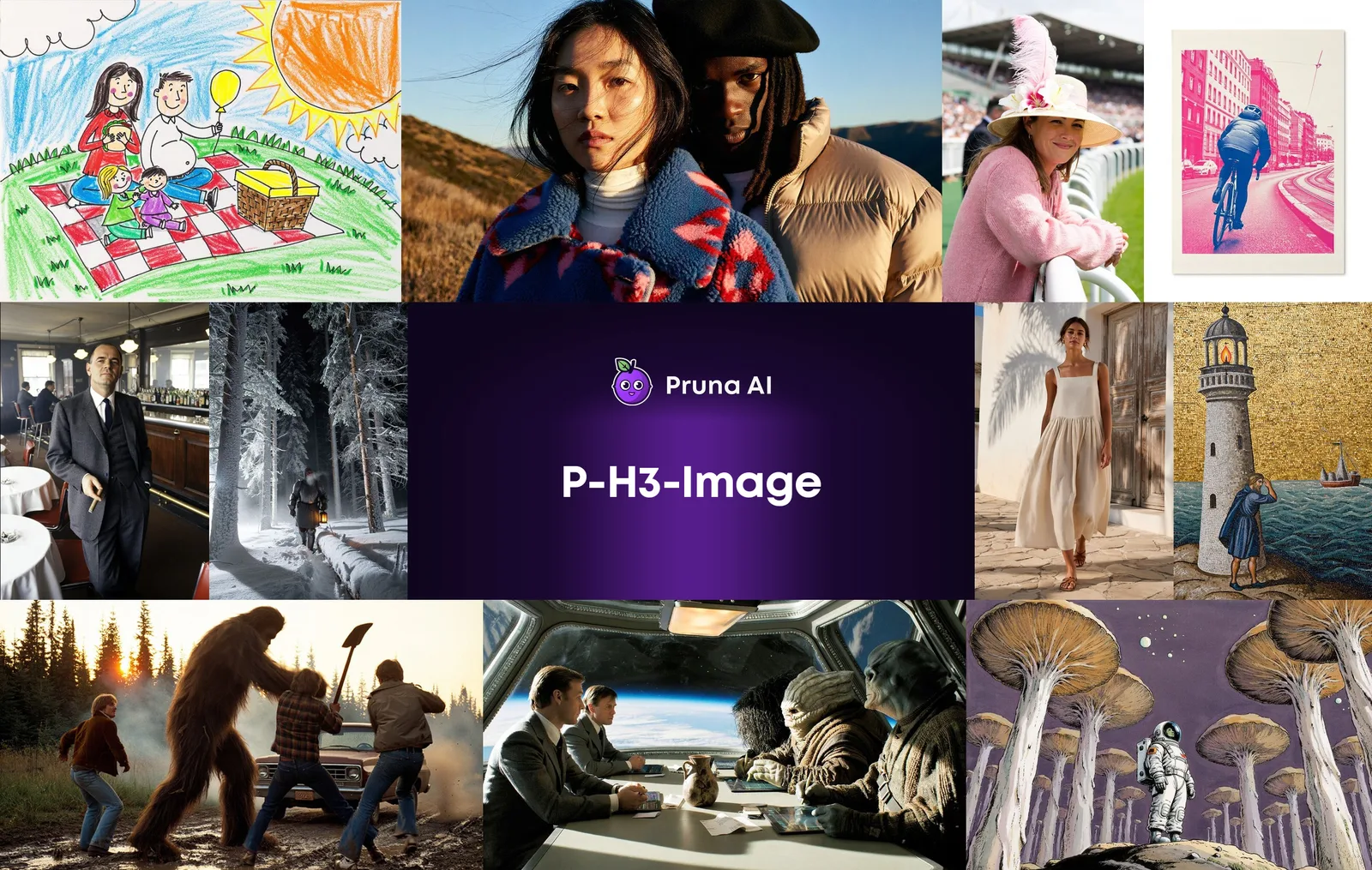
Every image below comes from Pruna AI’s P-H3-Image model card on Hugging Face; none were made on h3image.net. They show the range of styles, how edit prompts behave and what resolution does to a face.
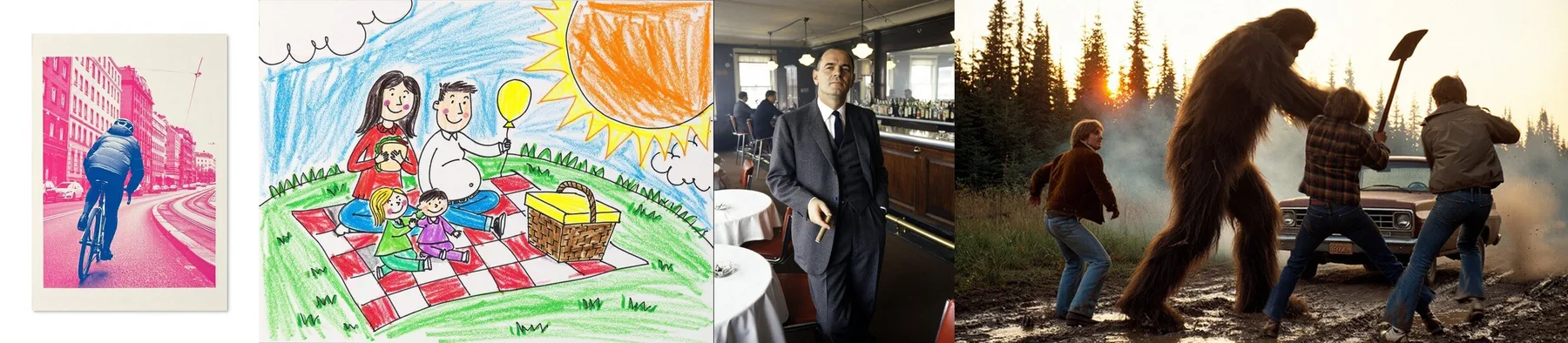
A risograph print, a child’s crayon drawing, a 1960s color photograph and a 1970s film frame. The first sentence of each prompt says which kind of picture it is.
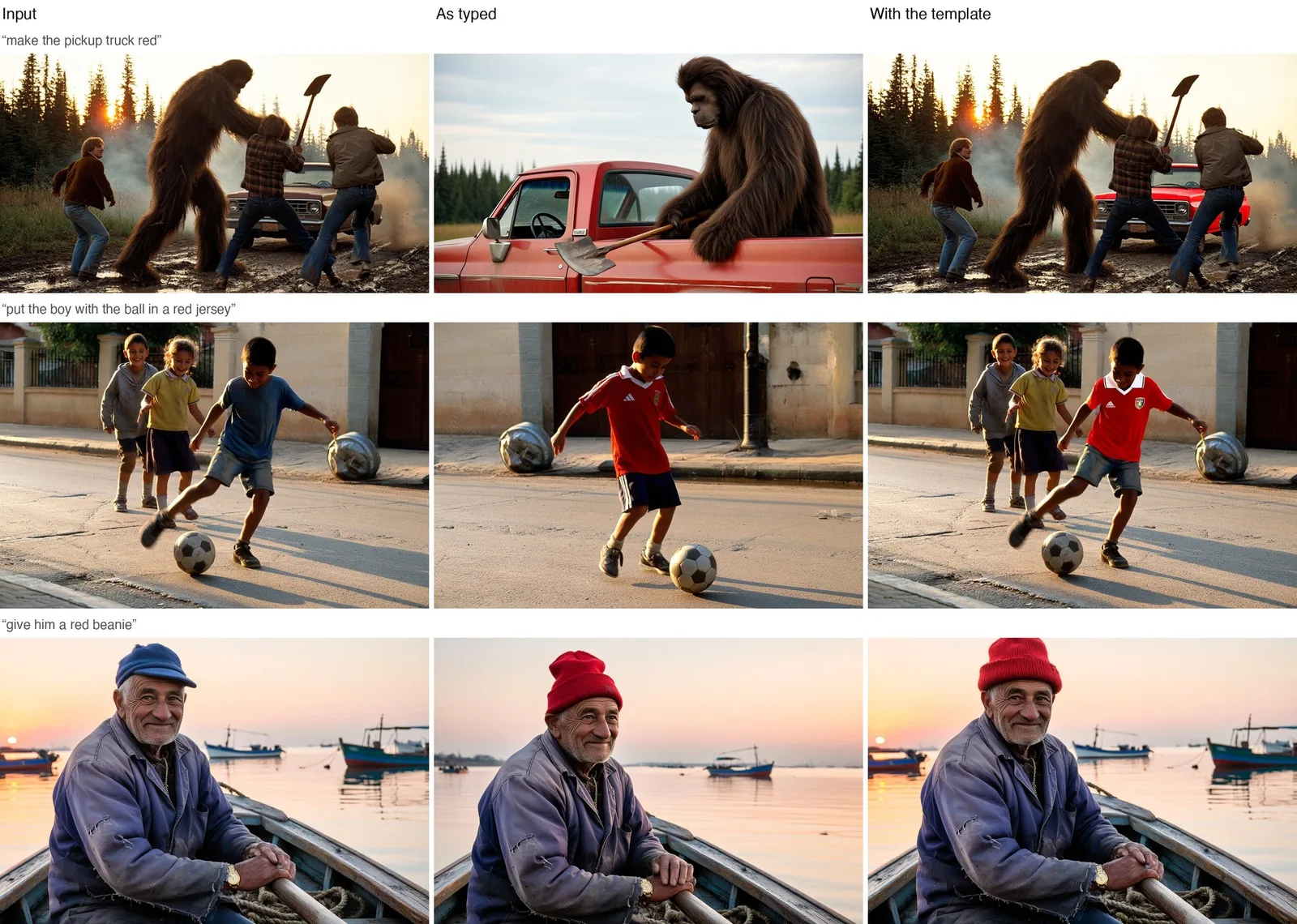
Three requests: make the pickup truck red, put the boy with the ball in a red jersey, give him a red beanie. Typed as is, the model often redraws the scene. Written as an edit prompt that names what to keep, only the requested part changes.
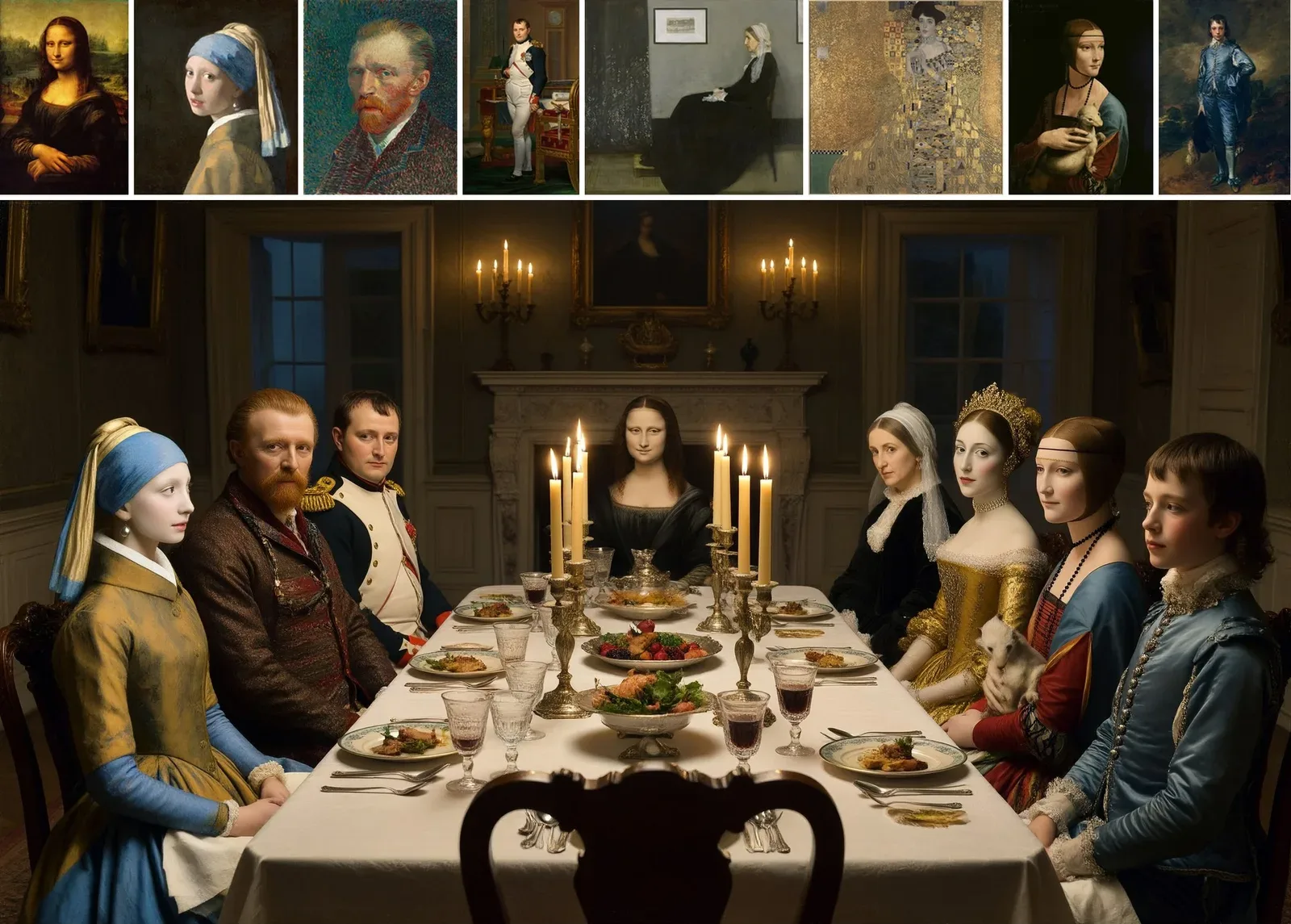
Eight public-domain portrait paintings in the top row are combined into one candle-lit dinner party scene from a one-sentence request.
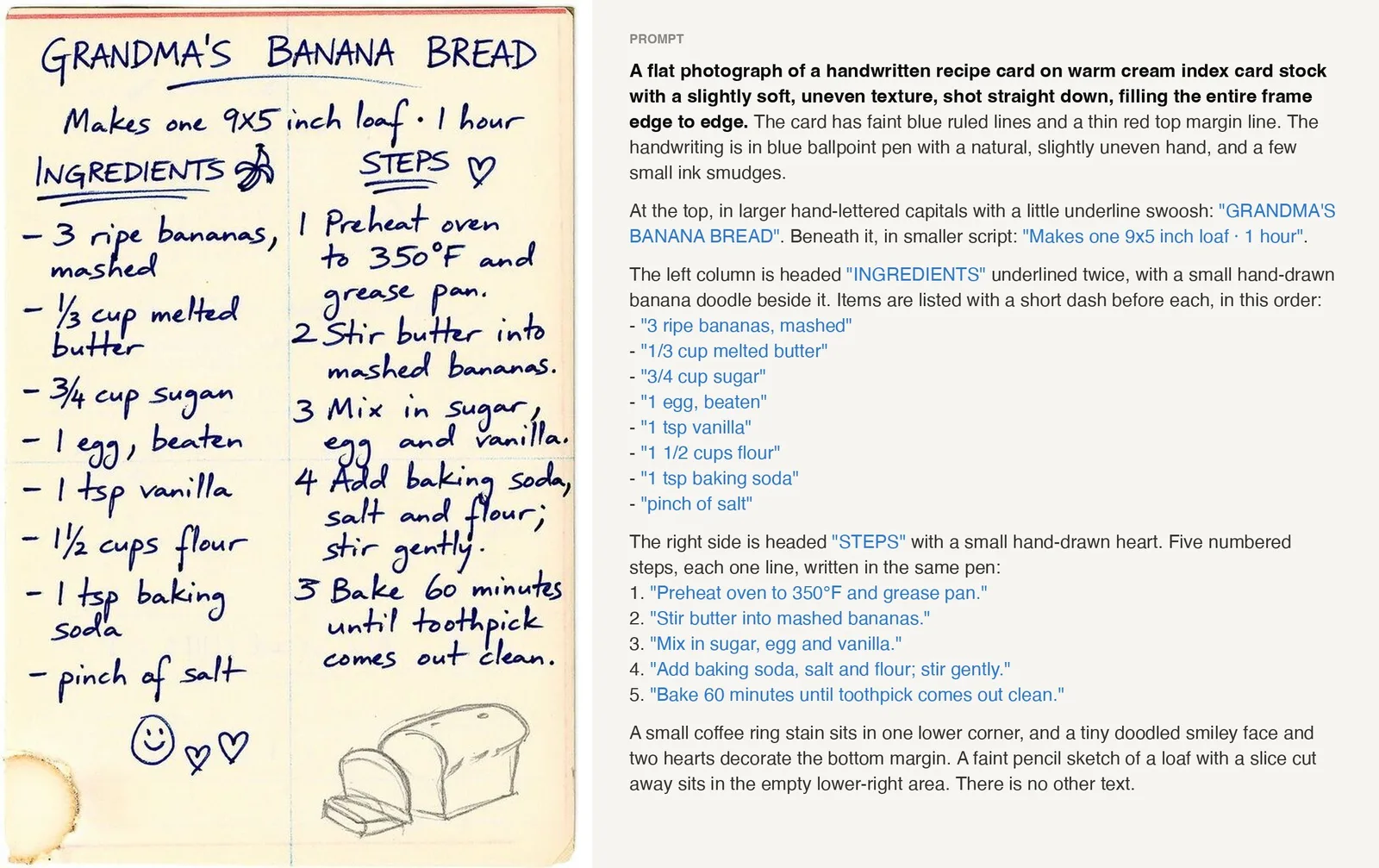
The first sentence says what the picture is and the text strings are in quotes. The handwriting in the result follows the quoted text almost word for word.
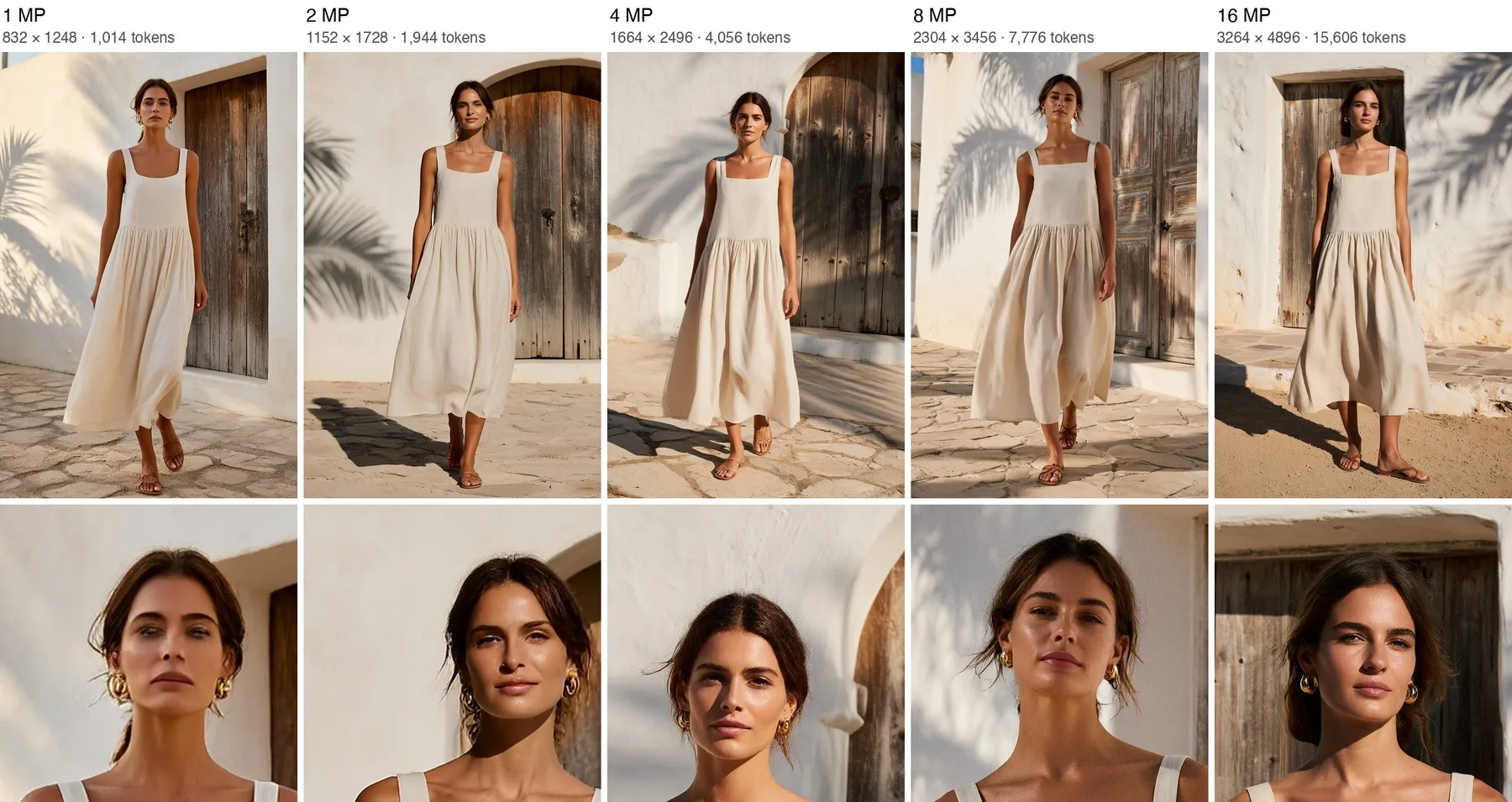
The same prompt and seed at each size, with the face enlarged. At 1 MP the skin looks smooth and waxy; from 8 MP on, skin texture, stray hairs and gold earrings come through.
Images: Pruna AI · Hugging Face
You don’t need a GPU or any install. Sign in, pick a mode, write the prompt and choose a size.
New accounts get 2 welcome credits, valid for 365 days: enough for one 1K image. No card is needed.
For a new picture, stay on Text to image. To change a photo, switch to Edit images and upload 1 to 8 JPG, PNG or WebP files. Image 1 is the one that gets edited.
Describe one scene in plain sentences, up to 4,000 characters. For edits, start with Edit <Picture 1>, describe the finished result, then list what must stay as it is.
Choose 1K to 4K, an aspect ratio and JPEG, PNG or WebP. The credit cost appears under the Generate button. When the image is ready it is saved to your history, where you can download it.
Say what the image is first
Open with the kind of picture: “a photograph by an experienced street photographer” or “a two-color risograph print”. The rest of the prompt follows from it.
Describe one scene
Give a viewpoint, one main subject caught in a moment, a few supporting details, and light with a source and a direction.
Quote each text string exactly
Put each piece of text in quotes, for example “NIGHT RIDE”, keep it short, say where it sits and end with “no other text”. If you want no text at all, don’t mention signs or labels.
Leave out hype words
Words like stunning, epic, cinematic, vibrant, hyper-detailed, 8k and masterpiece push the image toward a glossy, oversaturated, airbrushed look.
Each image run costs 2 to 12 credits depending on mode and size. A 2K image (about 4 MP) costs 3 credits and a 2K edit costs 5. Packs are paid once and never expire; monthly plans add credits every month.
Starter
For trying a few prompts and edits
Plus
For regular image and edit work
Pro
For large batches and 4K output
FAQ
Answers about the model, this site, running it yourself and the license.
P-H3-Image is an open-weight image model from Pruna AI, published on Hugging Face in early November 2026 and built on MiniMax-H3. It makes images from text and edits images, taking 1 to 8 input images: picture 1 is the one being edited and the others are references. It samples in 8 steps without classifier-free guidance or a negative prompt, and works best at about 8 MP.
Yes. When you sign in with Google you get 2 welcome credits, valid for 365 days, which is enough for one image at 1K. A daily check-in adds more credits over a 7-day cycle that repeats (2, 2, 4, 2, 2, 2 and 6), each valid for 30 days. You don’t need a card for either. After that, credits come from packs or a monthly plan.
Text to image costs 2 credits at 1K or 1.5K, 3 at 2K, 5 at 3K and 7 at 4K. An edit costs 4 credits at 1K or 1.5K, 5 at 2K, 8 at 3K and 12 at 4K, the same whether you upload 1 image or 8. The exact cost is shown on the button before each run, and if a run fails or is blocked by the content filter, the credits go back to your balance.
ComfyUI 0.44.0 or later, about 35 GB of disk space for the model files, and about 21 GB of VRAM with the int8 files from the PrunaAI/P-H3-Image-Comfy repo. The Template Library has two workflows, P-H3-Image: Text to Image and P-H3-Image: Image Edit. Our ComfyUI guide lists every file and the folder it goes in.
Yes, both. The full weights and a diffusers pipeline are on Hugging Face under PrunaAI/P-H3-Image; in bf16 they need about 83 GB of GPU memory at 8 MP without the prompt upsampler and about 101 GB with it, or about 76 GB peak on one 80 GB GPU with CPU offloading. If you would rather not host it, the model is also available through a hosted API. Our prompt guide shows where to call it and has a short code example.
No. The base model, MiniMax-H3, is a video and multimodal model, but P-H3-Image was adapted for still images and outputs images only, with no video or audio. On this site you get one JPEG, PNG or WebP image per run.
The MiniMax H3 Community License. It excludes the European Union, the United Kingdom, the Republic of Korea and the United States unless you have a separate license from MiniMax, and products built on the model must show “Powered by MiniMax H3”. The Qwen-based text encoder parts and prompt upsampler are Apache 2.0. This is a summary, not legal advice: read the license on the model card before using the model or its images commercially.
The h3image.net team. P-H3-Image is published by Pruna AI and built on MiniMax H3; we run the published model through a hosted API and write our own guides from the model card and the Comfy documentation. For questions about your account or credits, email support@h3image.net.
Sign in with Google, make one free 1K image and see what the model does with your idea.
Open the generator